
Download Xtensio – Collaborative Document & Presentation Builder
Overview
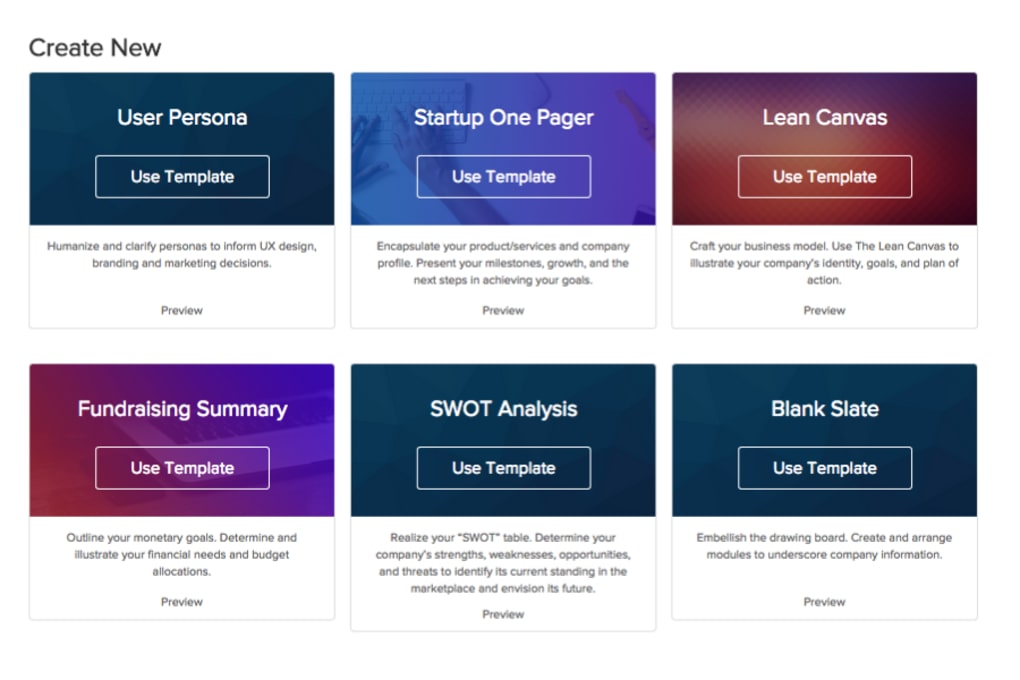
Xtensio is a cloud‑based platform that lets professionals design, collaborate on, and share a wide variety of visual documents, web pages, and slide decks. Whether you’re a marketer crafting a product brief, a startup founder pitching investors, or a sales team assembling a client proposal, Xtensio’s flexible canvas reduces the time spent on formatting and lets you focus on content strategy. The tool offers an extensive library of pre‑made templates ranging from business model canvases and pitch decks to social media reports and product roadmaps.
Users can start from a ready‑made layout or build a custom page from scratch, adding text blocks, images, charts, icons, and interactive elements with simple drag‑and‑drop actions. Because everything lives in the cloud, changes are saved automatically and synced across all devices, so teammates see the latest version in real time. Collaboration is built‑in: you can invite reviewers, assign editing permissions, and leave comments directly on the canvas.
Once a folio is polished, it can be presented live, exported as a PDF, or embedded on a website with a secure share link. In short, Xtensio combines the visual polish of a design tool with the collaborative power of a project‑management suite, making it a go‑to solution for teams that need to produce high‑impact documents quickly and securely.
Core Features & Benefits
- Template Marketplace: Over 200 industry‑specific templates, including pitch decks, one‑page business plans, market research reports, and brand guidelines.
- Drag‑and‑Drop Canvas: Intuitive interface that lets you add text, images, charts, icons, and video without any coding knowledge.
- Real‑Time Collaboration: Multiple users can edit the same document simultaneously, with live cursor indicators and comment threads.
- Version History & Auto‑Save: Every edit is automatically saved, and you can revert to previous versions at any time.
- Responsive Sharing Options: Share via secure link, embed in a website, or export to PDF, PNG, or PowerPoint formats.
- Brand Kit Integration: Upload your logos, color palettes, and typography to ensure brand consistency across all assets.
- Analytics Dashboard: Track viewer engagement, time‑on‑page, and interaction metrics for shared folios.
- Team Permissions: Granular control over who can view, comment, or edit each document.
- Cross‑Device Sync: Access your projects from Windows, macOS, Android, or iOS browsers without losing functionality.
- Secure Cloud Storage: All data is encrypted in transit and at rest, meeting GDPR and SOC 2 compliance standards.
These features translate into tangible benefits for businesses of all sizes. Marketing teams can roll out campaign decks in minutes rather than days, while product managers can keep roadmaps up‑to‑date with live data visualizations. The built‑in analytics let you see which sections of a pitch are resonating with investors, enabling data‑driven refinements before the next meeting. Moreover, the brand kit ensures that every stakeholder presents a unified visual identity, reducing the risk of off‑brand materials slipping through the cracks. Because Xtensio is hosted in the cloud, there’s no need for costly software licences or on‑premise maintenance—just a subscription that scales with your team’s needs.
Installation, Usage & Compatibility
Getting Started – Quick Installation Guide
Xtensio is a web‑based SaaS application, so there is no traditional “installation” process. To begin, navigate to xtensio.com and click the “Sign Up Free” button. You can register using an email address, Google, or Microsoft account. After confirming your email, you’ll be taken to the dashboard where you can create a new project by selecting “New Folio” and choosing a template or a blank canvas.
Step‑by‑Step Usage
- Select a Template: Browse categories or use the search bar to find a layout that matches your use case.
- Customize Content: Click any element to edit text, replace images, or adjust chart data. Use the left‑hand toolbar to drag new components onto the page.
- Invite Collaborators: Click the “Share” button, set permissions (Viewer, Commenter, Editor), and send invites via email.
- Review & Iterate: Collaborators can leave inline comments. Resolve comments by clicking the checkmark, which updates the version history.
- Publish or Export: When the folio is ready, choose “Present” for a live view, “Export” for PDF/PowerPoint, or “Embed” to place it on a website.
Supported Operating Systems
Because Xtensio runs entirely in a web browser, it is compatible with all modern operating systems, including:
- Windows 10, 11 (any recent version of Edge, Chrome, or Firefox)
- macOS Monterey, Ventura, and later (Safari, Chrome, Firefox)
- Linux distributions with a supported browser (Chrome, Firefox)
- Android 8.0+ (Chrome or Firefox mobile browsers)
- iOS 13+ (Safari or Chrome)
For teams that prefer a native feel, Xtensio also offers progressive web app (PWA) capabilities. By selecting “Add to Home Screen” in Chrome or Safari, you can launch the application from your desktop or mobile home screen, giving you an app‑like experience while still leveraging the cloud backend.
Pros & Cons
Pros
- Extensive template library speeds up document creation.
- Real‑time collaboration reduces email back‑and‑forth.
- Automatic version control safeguards against data loss.
- Responsive design works seamlessly on desktop and mobile.
- Brand kit ensures visual consistency across all assets.
- Secure cloud storage meets enterprise compliance standards.
- Export options (PDF, PPT, PNG) fit most presentation workflows.
- Analytics provide insight into viewer engagement.
Cons
- Limited offline functionality; a stable internet connection is required.
- Advanced design customizations (e.g., complex animations) are not as robust as dedicated design tools like Adobe Illustrator.
- Pricing tiers may be high for very small teams or freelancers.
- Learning curve for users unfamiliar with drag‑and‑drop editors.
- Some third‑party integrations (e.g., CRM sync) are only available on higher‑tier plans.
FAQ
Is Xtensio free to use?
Xtensio offers a free tier that includes basic templates and limited collaboration features. For advanced branding, analytics, and premium templates, you’ll need to upgrade to a paid plan.
Can I export a presentation created in Xtensio to PowerPoint?
Yes. Xtensio allows you to export any folio as a PowerPoint (.pptx) file, preserving most of the layout, images, and text formatting.
How secure is the data stored in Xtensio?
All data is encrypted in transit (TLS) and at rest (AES‑256). Xtensio complies with GDPR, SOC 2, and ISO 27001 standards, making it suitable for enterprise use.
Does Xtensio integrate with other business tools?
Yes. Xtensio provides native integrations with Google Drive, Slack, Zapier, and Microsoft Teams. Higher‑tier plans also include API access for custom workflows.
Can I collaborate with external partners who don’t have an Xtensio account?
External collaborators can be invited via a share link that grants view‑only or comment access without requiring a full account. For editing rights, they will need to create a free Xtensio account.
Conclusion – Why You Should Download Xtensio Today
If your organization spends countless hours formatting pitches, reports, or marketing decks, Xtensio offers a streamlined, cloud‑first alternative that saves time while boosting visual impact. Its rich template library, real‑time collaboration, and secure sharing make it a versatile choice for startups, agencies, and enterprise teams alike. The ability to export to familiar formats, embed live folios on websites, and track viewer engagement adds layers of value that most static document tools lack. While the free tier is sufficient for occasional use, the paid plans unlock branding, analytics, and deeper integrations—features that can dramatically accelerate product launches and market‑fit experiments. In a world where speed and polish are competitive advantages, downloading Xtensio is a strategic move that equips your team with a professional, secure, and easy‑to‑use visual communication platform.



.png)



